Calories Coach on Yesodi
By Guy Evgeni Levin · 2026-08-09
Trying to lose weight can become confusing very quickly. How many calories should you eat? How much did you eat today? Did your workout make a difference? Are you actually moving toward your goal?
Calories Coach by Yesodi is designed to make those questions simple. It gives you one clear daily number, helps you track what you eat and the exercise you do, shows your progress toward your goal weight, and gives you a personal coach you can ask questions along the way. Calories Coach is free to use for Yesodi members.
Start With Your Goal
When you begin, Calories Coach asks for a few basic details such as your current weight, height, age, sex, and activity level. The app uses this information to calculate your starting point and suggest a weight goal. You can accept the suggested goal or choose your own.
You will immediately see your current weight, your goal weight, and how many days you have to reach it. Instead of simply telling you to eat less, Calories Coach gives you a visible plan.
Know How Many Calories You Have Left Today
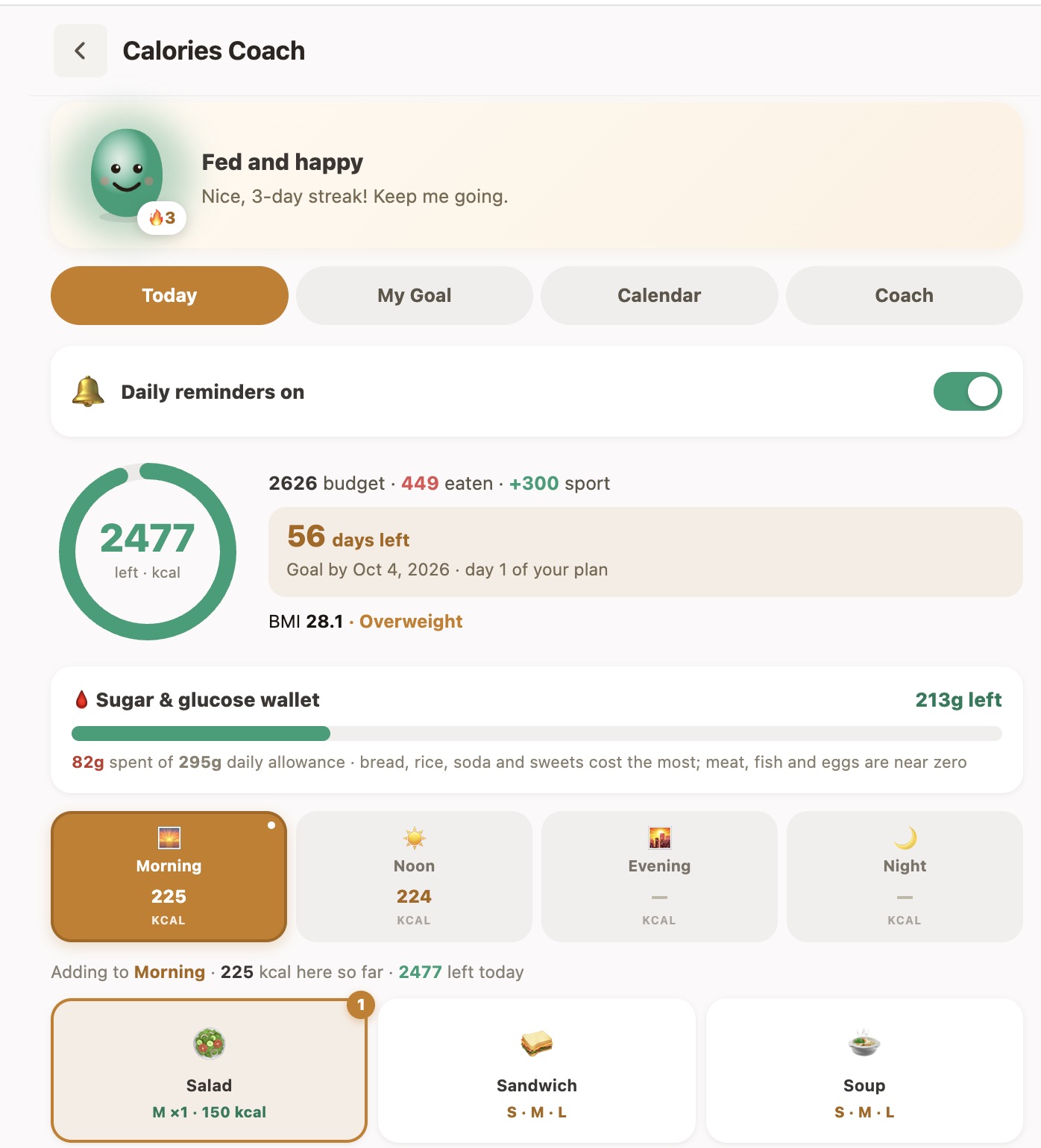
Every day begins with a personal calorie budget. As you add food, Calories Coach subtracts the calories you have eaten. When you add exercise, it can also show the calories you have burned.
Throughout the day you can quickly see your daily budget, calories eaten, exercise, and calories remaining. The large calorie ring makes it easy to understand your day without studying complicated charts.
Log Food in Seconds
Calories Coach is designed for quick daily use. Choose the part of the day—Morning, Noon, Evening or Night—and select what you ate.
Foods can have different portion sizes such as small, medium and large, helping you make a reasonable estimate without turning every meal into a calculation project. The purpose is simple: make tracking easy enough that you actually continue doing it.
See More Than Calories
Calories Coach also includes a Sugar & Glucose Wallet that helps you see how carbohydrate-heavy foods affect your daily intake. Foods such as bread, rice, sugary drinks and sweets use more of the allowance, while foods such as meat, fish and eggs contribute very little.
It gives you another simple way to understand what you are eating instead of looking only at total calories.
See the Road to Your Goal
The My Goal screen turns your target into a visual journey. You can see your starting weight, target weight, projected progress and the number of days remaining.
As your real eating and activity change, your progress can be updated too. That means the goal isn't just a number you entered once—it becomes something you can follow day by day.
Your Personal Calories Coach
Sometimes you don't need another chart. You just want to ask what you should eat for dinner.
The Coach knows your numbers and can use the calories you have remaining that day to help you think about your next meal. You can also ask questions about your daily progress, food choices and your goal.
Build a Streak
Calories Coach includ